2026 WVDP Candidate Support
2026 WVDP Candidate Support
2026 WVDP Candidate Support
This page intends to keep open communication with WVDP Candidates.
https://traindems.org/learning-plan/3/use-votebuilder-effectively

This report covers financial activity from:
January 1, 2026 – March 31, 2026 
You are required to file if you are:
• A candidate with an active campaign committee
• A pre-candidate raising or spending money
• A political action committee (PAC)
• A political party executive committee
• Any committee that has not yet closed out with a final report
Note: Candidates for executive committee do not file campaign finance reports. 
Your report must include all financial activity during the reporting period:
• Contributions (monetary and in-kind)
• Loans received
• Expenditures
• Unpaid bills
• Fundraising activity
• Any other income or financial transactions 
• State-level candidates and committees must file electronically through the Campaign Finance Reporting System (CFRS)
https://cfrs.wvsos.gov/public/home
• County and municipal candidates file using paper forms with their local filing officer 
When reporting online contributions, always report the full amount the donor gave and list any processing fees separately. CFRS tracks total money raised and total money spent. Fees must be recorded as expenditures, not deducted from contributions.
How to Do It
• Contributions:
Report each individual contribution at the gross amount the donor gave
• Fees:
Report transaction fees as an expenditure to ActBlue (or processor)
• Use the total fees as reported by the platform
• Report either by deposit/batch or as a monthly total
Example
• Donor A gives $50
• Donor B gives $25
• ActBlue deducts $2.85 in processing fees
Report:
• Contribution: $50 (Donor A)
• Contribution: $25 (Donor B)
• Expenditure: $2.85
• Payee: ActBlue
• Purpose: Processing fees
• Date: Use batch date or monthly reporting date
Key Rule
Do not subtract fees from contributions.
Always report gross contributions and separate expenditures.
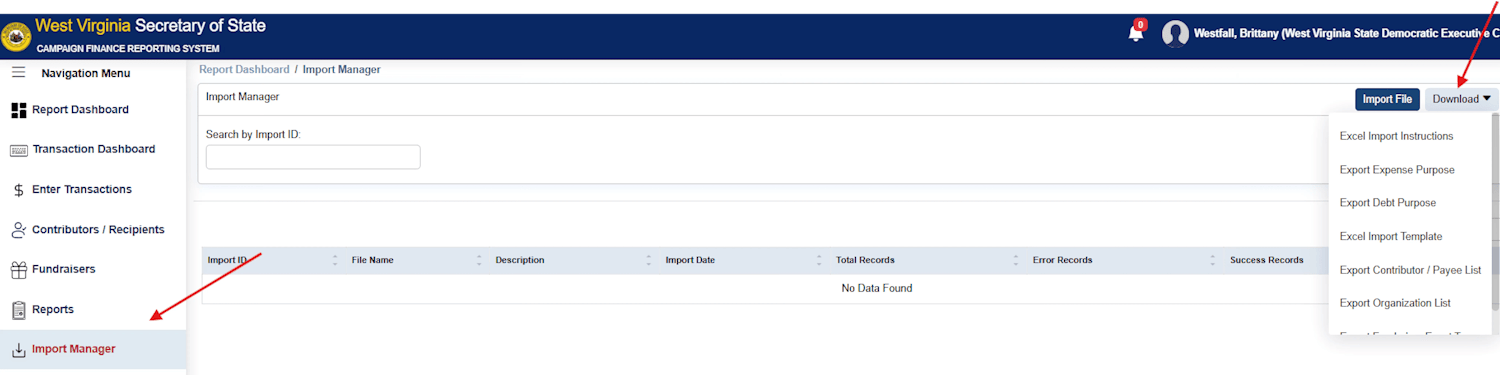
Download the Excel Import Template here.
All filed reports become public record and are available through the CFRS public portal. The system allows users to:
• Search candidates and committees
• Track contributions and expenditures
• Download reports and datasets 
• Reports must be filed in order without skipping periods
• Late or missing reports can result in daily fines and penalties
• Candidates who fail to file required reports risk ballot access issues 
• Have nothing to report? You MUST still file a report - even if it is all zeros.
Need Help?
If you have questions:
• Visit the CFRS Help Library
• Contact the WV Secretary of State’s Office:
(304) 558-6000 - ask for Campaign Finance
campaignfinance@wvsos.gov
• Reach out to the WVDP team for support